Dr. Scholl’s
Refreshing a legacy healthcare brand through UI-focused redesign during site migration.
-
Dr. Scholl’s is a long-established footcare brand with a wide product portfolio. This project involved redesigning key interface components during the migration of the Dr. Scholl’s website from Bayer’s infrastructure to a new platform.
My primary responsibility was UI design and visual system execution, working in close collaboration with UX, development, legal, and business teams to ensure the interface supported user needs, brand consistency, and compliance requirements.
-
The visual direction focused on modernizing the interface while preserving the trust and familiarity associated with the Dr. Scholl’s brand.
UI goals
Clarify navigation and reduce visual clutter
Improve hierarchy across product and solution pages
Support solution-based discovery through clear interface cues
Ensure consistency across desktop and mobile layouts
Two visual directions were explored to evaluate tone and emphasis:
A product-science-forward UI with simplified components and restrained styling
A more active, lifestyle-oriented UI using bold typography, imagery, and color
-
The UI was designed to support a solution-first browsing experience without overhauling underlying UX flows.
Navigation & layout
Designed a mega menu UI to surface product categories, promotions, and retail pathways
Visual hierarchy emphasized awareness and quick access rather than deep exploration
Persistent calls to action supported conversion and retail discovery
Homepage UI
Hero treatments designed to support product launches and campaigns
Modular content blocks highlighting solutions, benefits, and social proof
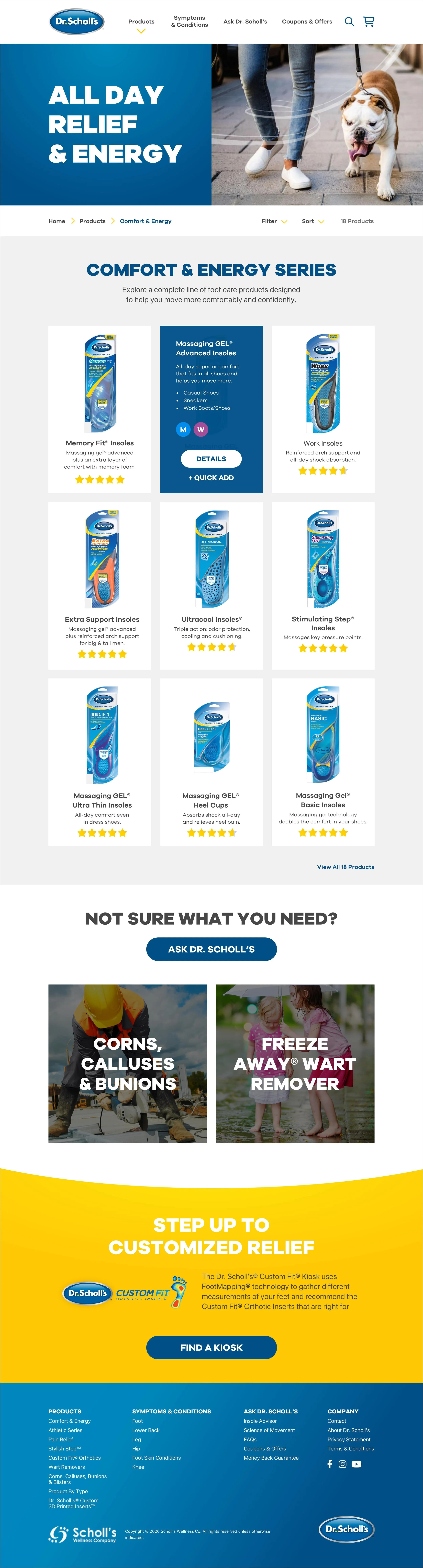
Product category UI
Filter UI designed to visually guide users toward relevant products
Progressive visual filtering reduced on-screen noise as users refined choices
Product detail UI
Tabbed interface to reduce scrolling and improve readability
Clear presentation of instructions, recommendations, and support prompts
Mobile-first layouts ensuring critical information remained visible
-
While UX strategy, development, and platform decisions were owned by other team members, I collaborated closely to ensure the UI translated effectively into the final build.
Collaboration focus
Partnered with UX designers to align visual hierarchy with user flows
Worked with developers to ensure UI fidelity across breakpoints
Collaborated with legal and compliance teams to support approved health messaging
Participated in QA reviews to validate visual consistency and accessibility
This approach ensured the interface design was both polished and production-ready without overstepping ownership boundaries.
-
The final UI improvements contributed to a clearer, more modern interface that better supported solution-based browsing and mobile usability—while maintaining the brand credibility expected of a healthcare product.
Key outcomes
Cleaner navigation and improved visual hierarchy
Stronger alignment between brand, content, and interface
Improved mobile presentation and consistency
A UI system flexible enough to support future site growth
Key takeaways
UI clarity plays a critical role in guiding users through complex product ecosystems
Strong collaboration ensures visual design translates effectively into production
Clear role definition strengthens trust and credibility in cross-functional projects
-
UI Design · Visual Systems · Interaction Design · Design Collaboration
User Interface

Website